
People and roles
What owners, admins, members and guests can do, and how to change roles, deactivate people and reset authenticator apps.
Every person in a workspace has one of four roles. This page lists exactly what each role can do, and how owners and admins manage people in Admin › People.
The four roles
- Owner: the person who set up Huddle. There is one owner, and the role can’t be given to anyone else from the app.
- Admin: helps run the workspace. Owners make admins.
- Member: everyone on the team.
- Guest: someone from outside the team, such as a client or contractor. Guests only see the channels they’re invited to and the people in them.
What each role can do
| Owner | Admin | Member | Guest | |
|---|---|---|---|---|
| Post, react and share files in conversations they’re in | Yes | Yes | Yes | Yes |
| Edit and delete their own messages | Yes | Yes | Yes | Yes |
| Delete anyone’s messages | Yes | Yes | No | No |
| Browse, read and join public channels | Yes | Yes | Yes | No |
| Create channels | Yes | Yes | Yes | No |
| Change a channel’s topic (as a member of it) | Yes | Yes | Yes | Yes |
| Rename or archive a channel | Yes | Yes | Their own channels | No |
| Add people to a channel they’re in | Yes | Yes | Yes, except guests | No |
| Add a guest to a channel | Yes | Yes | No | No |
| Remove people from a channel | Yes | Yes | No | No |
| Start direct messages | Anyone | Anyone | Anyone | People they share a channel with |
| See other people’s email addresses | Yes | Yes | Yes | No |
| Invite members and guests | Yes | Yes | No | No |
| Invite admins | Yes | No | No | No |
| Change roles | Admins, members, guests | Members and guests | No | No |
| Deactivate people and create reset links | Anyone but themselves | Members and guests | No | No |
| Workspace settings, email, webhooks, security log, usage | Yes | Yes | No | No |
| Import from Slack and export | Yes | No | No | No |
A few rules hold everywhere:
- Nobody can change their own role, and nobody can make someone an owner.
- #general can’t be archived.
- If someone isn’t in a private channel, Huddle doesn’t even tell them it exists.
Letting members invite guests
In Admin › Workspace, under Guests, tick Members can invite guests to allow members to invite guests too. Otherwise only owners and admins can. At the moment the invite form is in Admin, which only owners and admins can open, so members can only use this through the API (for developers).
Change someone’s role
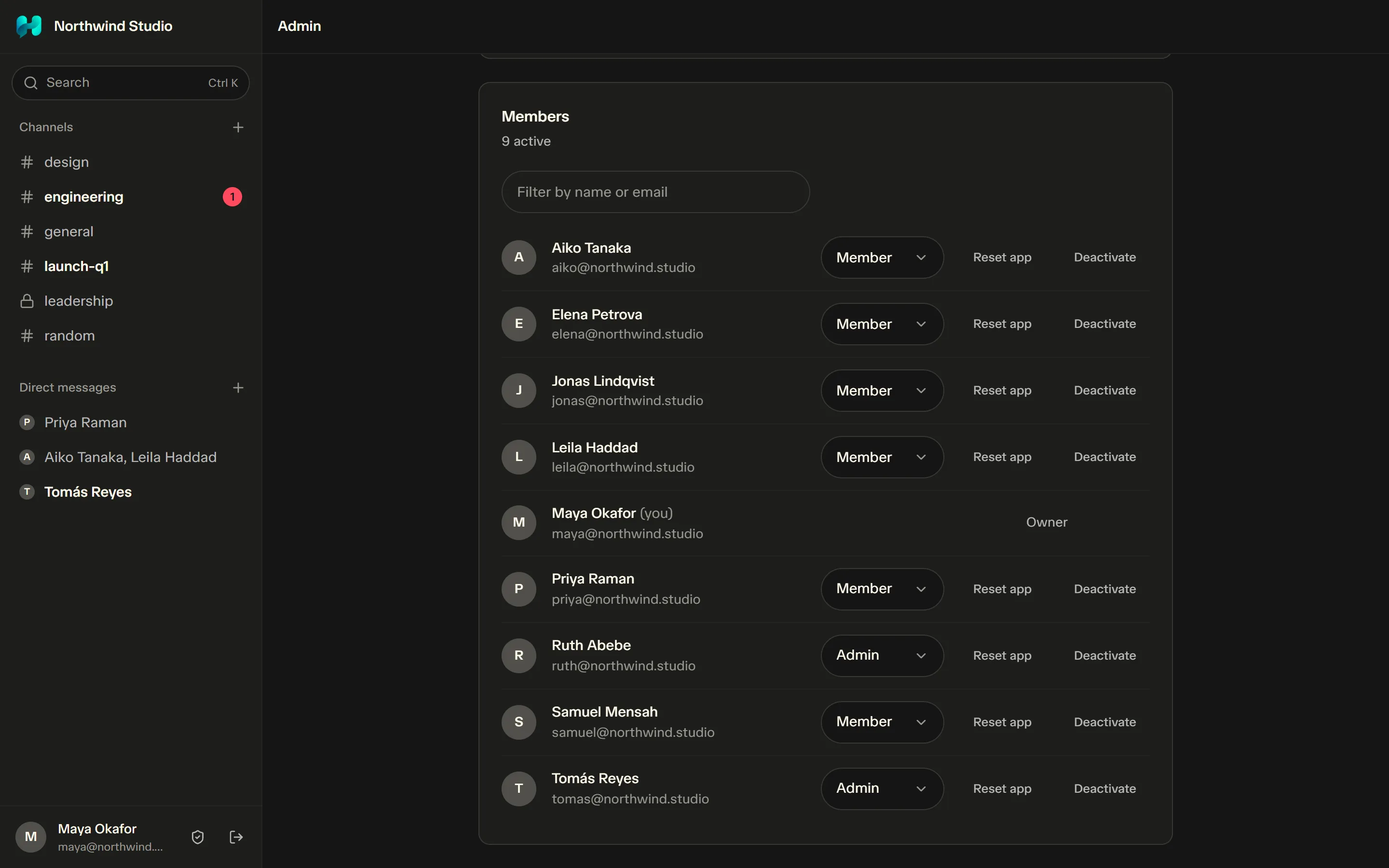
In Admin › People, under Members, choose a new role from the list next to their name. The change applies straight away and is recorded in the security log.
Deactivate someone
Select Deactivate next to their name and confirm. They’re signed out everywhere at once, their open connections close, and they can’t sign in until you select Reactivate. Their messages stay.
Reset an authenticator app
When someone loses their phone, select Reset app next to their name. Huddle shows a one-time link that works for 7 days. Send it to them; it lets them set up the app on a new phone. Their old app keeps working until they use the link.
Guests with an end date
A guest’s access can be given an end date. After that date, the guest can no longer open the workspace, and Admin › People shows Access ends with the date. There’s no button for this yet: a developer can set it through the API (PATCH /api/members/:userId with guestExpiresAt).